

How to Get Cleaner Jigsaw Cuts: Blade Selection & Cutting Techniques
One tool that always remains close to my workbench is the humble jigsaw. It's handy for quickly breaking down stock into manageable pieces, cutting curves, and removing waste in areas that would be difficult to reach with other woodworking tools.
For fine woodworkers and DIYers alike, a jigsaw is a versatile and relatively inexpensive way to fill the gaps between other power tools. However, many woodworkers shy away from using one for precision work because of its reputation for producing rough cuts, chipped edges, and unintended bevels.
Fortunately, getting cleaner cuts from a jigsaw doesn't necessarily require purchasing a new saw. Choosing the right blade, adjusting the saw's settings, and refining your cutting technique can make a significant difference.
Why Do Jigsaws Produce Rough Cuts?
A jigsaw is essentially a vertically oriented reciprocating saw that excels at cutting irregular shapes, much like a handheld scroll saw.
Unlike a scroll saw or band saw, however, you're bringing the tool to the workpiece rather than moving the workpiece through a stationary machine.
This makes a jigsaw particularly useful when working with large panels, cutting interior openings, or making cuts where the frame of a band saw would interfere.
Several characteristics of a typical jigsaw can work against producing clean, accurate cuts:
- Aggressive blade designs that prioritize cutting speed.
- Orbital settings designed for rapid material removal.
- Unsupported blade ends that can flex or twist.
- Upward cutting action that can cause surface tearout.
- Excessive feed pressure, particularly when cutting curves.
Understanding these limitations is the first step toward getting better results.
Choosing the Best Jigsaw Blade for Clean Cuts
Like most woodworking tools, the usefulness of a jigsaw is largely determined by its cutters.
Jigsaw blades are available in a wide variety of configurations, with differences in tooth count, tooth geometry, blade width, and blade length. Each of these characteristics affects how quickly the blade cuts, how smoothly it cuts, and how easily it can follow a curve.
Here's a closer look at several blade styles that are particularly useful for woodworking.
Straight-Cut and Curved-Cut Jigsaw Blades
General-purpose straight-cut and curved-cut blades are useful for quickly breaking down stock and removing waste.
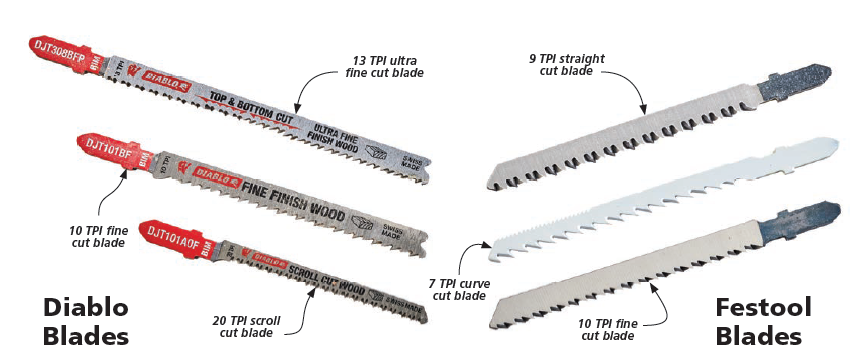
The straight-cut and curved-cut Festool blades shown above are good examples. They're relatively inexpensive and remove material efficiently, but they aren't necessarily the best choice when surface quality is important.
Straight-cut blades generally have a wider body that helps them track along a straight line, while narrower curved-cut blades make it easier to follow tighter curves.
These blades are particularly useful when you plan to refine the cut later with another woodworking tool.
Fine-Cut Jigsaw Blades
A fine-cut blade is a good starting point when you're looking to improve the quality of your jigsaw cuts.
Compared with the general-purpose blades shown above, fine-cut blades feature a higher tooth count, measured in teeth per inch (TPI), along with a different tooth geometry.
These characteristics allow the blade to remove material more gradually, producing a smoother cut with less surface damage.
Fine-cut blades are a good choice for many everyday woodworking applications where you want a cleaner edge without sacrificing too much cutting speed.
Choose the Right Blade Length
Blade length is another important consideration that's easy to overlook.
For example, the Diablo fine-cut blade shown above is 4" long, while the comparable Festool blade is 3" long.
Although the longer blade might seem more versatile, additional blade length can also increase the tendency for the unsupported end to flex during a cut.
Whenever possible, choose the shortest blade that provides adequate cutting capacity for the thickness of your workpiece throughout the saw's stroke.
Reserve longer blades for thicker material that requires the additional reach.
Scroll-Cut Jigsaw Blades for Tight Curves
The Diablo scroll-cut blade is an interesting option for cutting intricate shapes.
The first thing you'll notice is its high tooth count — approximately twice that of the fine-cut blades shown here.
The blade also features triangular teeth with cutting edges on both sides, allowing it to cut on both the upstroke and downstroke.
Combined with its narrow profile, this tooth design makes the blade particularly useful for cutting tight curves.
Although it cuts more slowly than a general-purpose blade, it offers several advantages:
- A tighter turning radius.
- Reduced likelihood of chipout.
- Greater control when cutting intricate shapes.
- A smoother finished edge.
When cutting decorative profiles or curved furniture components, the slower cutting speed is often a worthwhile trade-off.
Ultra-Fine Jigsaw Blades for Reducing Tearout
Another useful option is Diablo's ultra-fine blade.
This blade has a higher tooth count than the fine-cut blades but fewer teeth than the scroll-cut blade.
What makes it particularly interesting is the change in tooth direction near the midpoint of the blade.
The opposing tooth directions allow cutting to occur on both strokes. When properly matched to the thickness of the workpiece, this arrangement helps direct the cutting action inward from the faces of the material, reducing chipout.
This type of blade is particularly appealing when working with veneered panels, plywood, and other materials where surface quality is important.
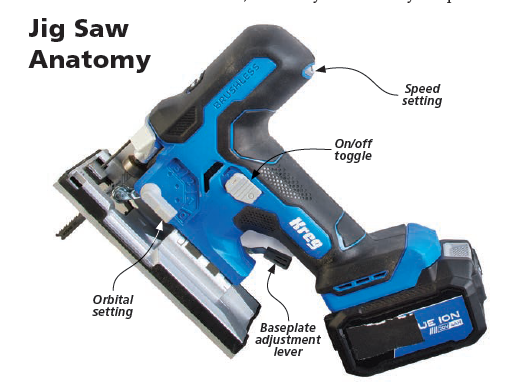
Turn Off the Orbital Action for Cleaner Cuts
Before making a cut, take a look at the orbital setting on your jigsaw.
On many jigsaws, the orbital action moves the blade forward into the cut on the upstroke and pulls it back on the downstroke.
This additional movement helps remove waste quickly and increases cutting speed. It's great for rough construction work or quickly breaking down stock, but it generally produces a rougher cut.
For fine woodworking, I prefer to turn the orbital action off when surface quality and cutting accuracy are important.
The saw may cut more slowly, but the more controlled blade movement helps reduce tearout and makes it easier to follow a layout line.
How to Prevent Jigsaw Blade Deflection
One of the most frustrating problems when using a jigsaw is cutting a curve only to discover that the edge of the workpiece has an unintended bevel.
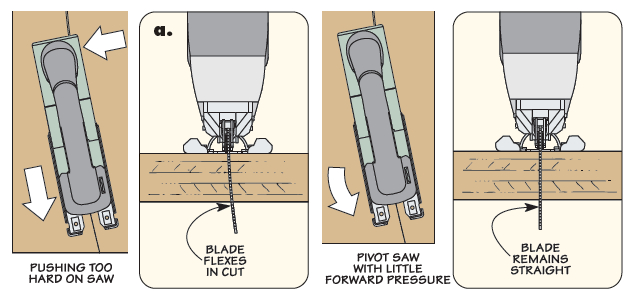
The cut may look accurate from above, but the blade has wandered away from the layout line on the underside of the workpiece.
This is a result of blade deflection.
Unlike a band saw or scroll saw blade, which is supported at both ends, a jigsaw blade is secured at only one end. The unsupported portion of the blade can flex when excessive pressure is applied.
This commonly occurs when you:
- Push the saw forward faster than the teeth can remove material.
- Attempt to cut a curve that's too tight for the width of the blade.
- Force the blade sideways against the wall of the kerf.
- Use a longer blade than necessary.
The key to reducing deflection is to let the blade do the work.
Improve Your Hand Position When Cutting Curves
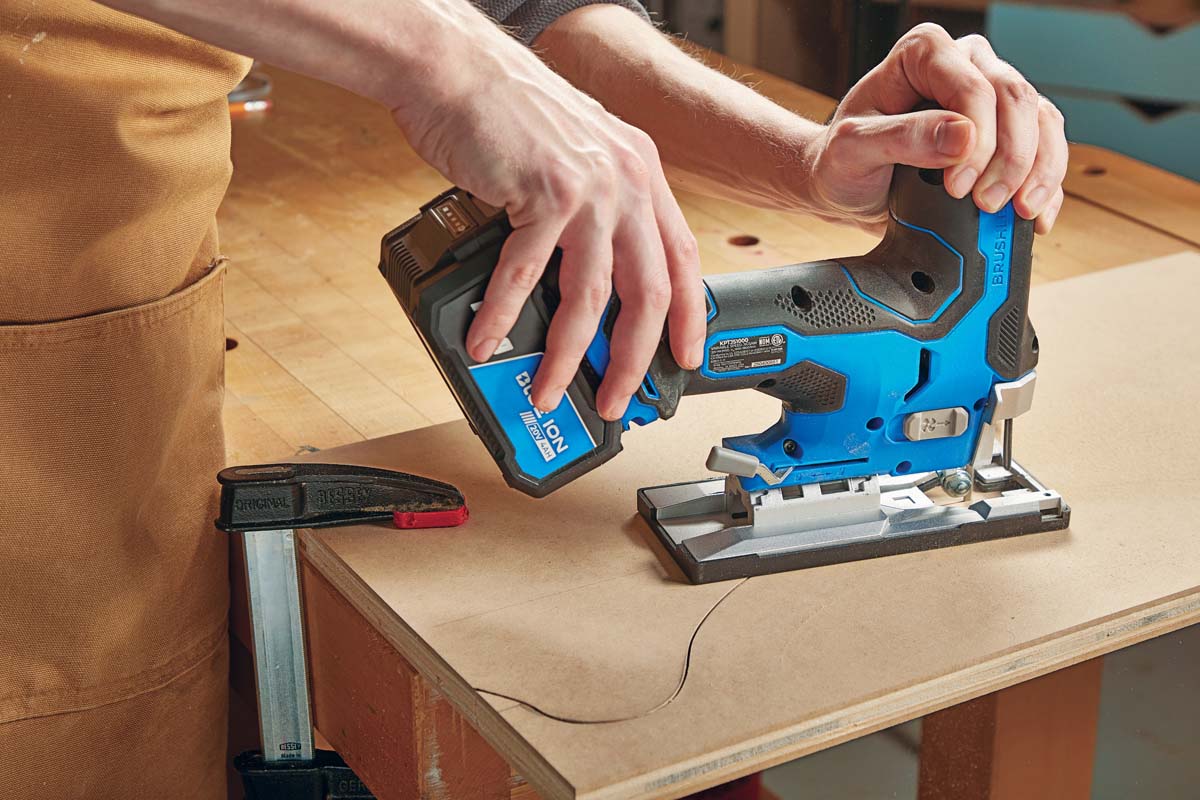
One technique I've found particularly useful when cutting curves is changing the way I hold and guide the saw.
Rather than pushing the saw primarily from the rear, I concentrate my control directly above the blade, using the saw's designated gripping surfaces. My other hand lightly guides the rear of the saw to help steer it through the curve.
This hand position helps limit the amount of forward and sideways pressure I apply to the blade.
It also makes it easier to control the direction of the cut without forcing the blade around a curve.
Keep the baseplate flat against the workpiece, feed the saw slowly, and allow the teeth to remove material at their own pace.
If the blade begins to bind or you find yourself forcing the saw through a turn, you may need a narrower blade better suited to the radius of the curve.
A slower, more controlled cut often produces better results and requires less cleanup afterward.
Make a Zero-Clearance Jigsaw Baseplate to Prevent Tearout
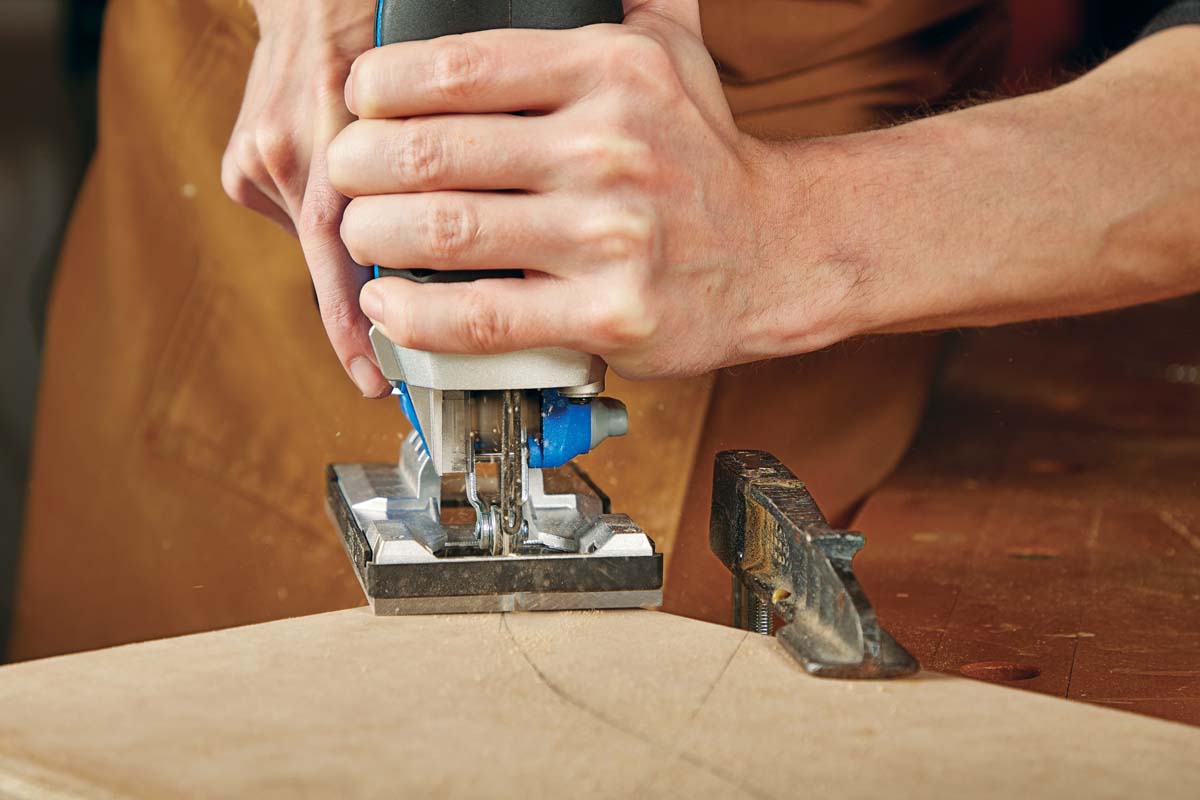
One final upgrade I recommend is a shop-made zero-clearance baseplate.
Just like a zero-clearance insert at the table saw, this simple accessory supports the wood fibers immediately adjacent to the blade, helping prevent them from lifting, chipping, or tearing during the cut.
It's particularly useful when cutting plywood and other materials with thin, decorative face veneers.
How to Make a Zero-Clearance Jigsaw Baseplate
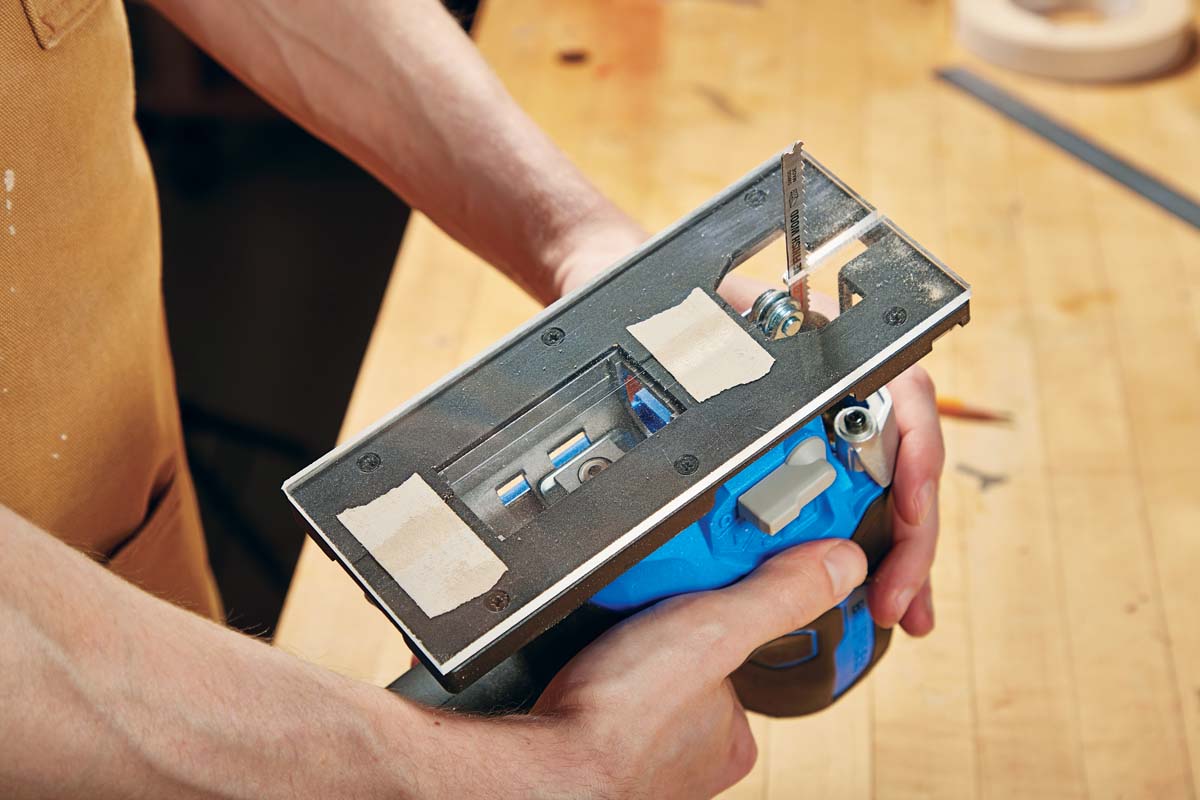
Making the auxiliary baseplate is a straightforward shop project.
Start by cutting a piece of clear acrylic to match the size and shape of your jigsaw's existing baseplate.
Next, create a narrow kerf to accommodate the blade. With the saw disconnected from its power source, attach the acrylic plate to the original baseplate using double-sided tape.
Make sure the auxiliary plate is securely attached and doesn't interfere with the blade's travel or other moving components.
I prefer cast acrylic for this application. A clear plate provides good visibility of the layout line while supporting the wood fibers on either side of the cut.
The result is a simple, inexpensive accessory that can help reduce tearout without permanently modifying your jigsaw.
Quick Tips for Getting Cleaner Jigsaw Cuts
Getting better results from a jigsaw comes down to a combination of blade selection, saw settings, and cutting technique.
Before making your next cut, keep these tips in mind:
- Select a fine-cut or ultra-fine blade when surface quality matters.
- Use a narrow scroll-cut blade for tight curves.
- Choose the shortest blade suitable for the thickness of the material.
- Turn off the orbital action for fine woodworking.
- Avoid excessive forward or sideways pressure.
- Keep the baseplate flat against the workpiece.
- Secure and adequately support the material.
- Use a zero-clearance baseplate to help prevent veneer tearout.
- Make a test cut in scrap material before cutting an important project part.
Get More from Your Jigsaw
A jigsaw may never completely replace the precision of a scroll saw or band saw, but that doesn't mean it has to be limited to rough cutting.
With the right blade, a few adjustments to the saw, and a more controlled cutting technique, you can produce cleaner edges, more accurate curves, and better-looking project parts.
Add a simple zero-clearance baseplate, and you've got another way to improve the performance of a tool that's already one of the most versatile in the woodworking shop.
More Woodworking Power Tool Tips & Techniques
Getting better results from your woodworking tools doesn't always require an expensive upgrade. Sometimes the right blade, a shop-made accessory, or a change in technique can make all the difference.
Explore more of Woodsmith's practical woodworking tips, tool upgrades, and shop-tested techniques to get the most out of the tools you already own.
READ MORE → Explore More Woodworking Tips & Techniques